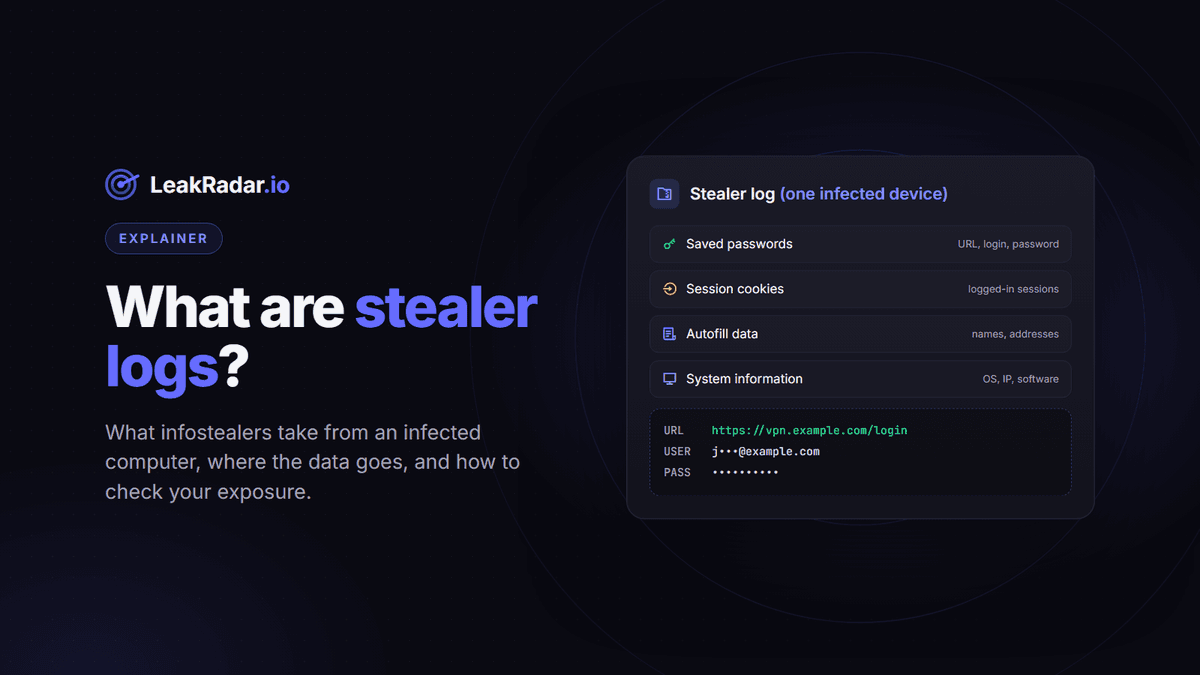
A stealer log is the package of data that infostealer malware takes from a single infected computer: the passwords saved in the browser together with the website each one belongs to, session cookies, autofill data and details about the machine. Once collected, these logs are shared and sold on Telegram channels and forums, where anyone can reuse them.
Stealer logs are a major source of leaked credentials, and one of the most dangerous, because they contain working passwords in plain text, tied to the exact login page. This article explains what is inside a log, how computers get infected, where the data ends up, and how to check whether your accounts or your company appear in one.
What is inside a stealer log
The exact content depends on the malware family. Microsoft's analysis of Lumma Stealer, which it calls a prolific infostealer, lists what a typical infostealer takes:
- Saved credentials: passwords stored in the browser, with the URL and the username or email each one was used with;
- Session cookies: the tokens that keep you logged in to websites;
- Autofill data: names, addresses, email addresses and phone numbers saved in the browser;
- Cryptocurrency wallets and wallet browser extensions;
- Application data: VPN configurations, email clients and some user documents;
- System information: operating system, hardware, language settings and installed software.
For an attacker, the credentials and the cookies are the most valuable part. The password comes with the exact address of the login page, so there is nothing to guess.
How computers get infected
Infostealers are typically sold or rented to other criminals: when police disrupted RedLine and META in 2024, they seized a database of the malware's clients. Those clients then distribute the malware. Microsoft and CISA describe the main infection routes:
- phishing emails with malicious links or attachments;
- malicious ads and compromised websites (drive-by downloads);
- cracked or fake versions of popular software;
- fake CAPTCHA pages that ask the victim to paste and run a command, a technique known as ClickFix.
Where stealer logs end up
Logs are collected on the attackers' servers, then shared or sold in batches, often on Telegram channels and on hacking forums. Along the way, the credentials are extracted from the original archives and redistributed as text lists, each line holding a URL, a login and a password. Some of them end up merged into large combolists: when Have I Been Pwned analysed combolists posted to Telegram in 2024, the data appeared to come from a mix of existing combolists and infostealer malware.
LeakRadar indexes this data once it has been published in the open: the parsed credentials (Stealer Logs dataset), the email:password pairs (Combolists), the original files (Raw) and forum posts (Dark Web). We do not hack systems, buy stolen data or take part in trading it.
Why stealer logs are more dangerous than a classic data breach
| Database breach | Stealer log | |
|---|---|---|
| What is compromised | One company's user database | One person's device |
| Accounts exposed | Accounts on that one service | The accounts saved in the browser, on any website |
| Passwords | Often hashed, sometimes in plain text | In plain text, as saved by the browser |
| Login page | Implied by the source | Exact URL for each credential |
| Extras | Profile data stored by the service | Session cookies, autofill, system details |
Three consequences matter most for a company:
- Work accounts leak from personal devices. In Verizon's 2025 Data Breach Investigations Report, 46% of the infostealer-compromised systems that held corporate logins were non-managed devices, storing both personal and business credentials. Protecting company laptops is not enough.
- MFA is not always enough. A stolen session cookie lets an attacker replay a session that was already authenticated, without the password or the second factor, as Microsoft and MITRE ATT&CK document.
- Remote access is a direct entry point. VPN, remote desktop and single sign-on credentials appear in logs like any other password.
Takedowns help, but logs keep circulating
Law enforcement and industry have disrupted major infostealer operations. In October 2024, Operation Magnus, led by the Dutch National Police with the FBI and coordinated through Eurojust, shut down servers and seized domains used by the RedLine and META infostealers. In May 2025, the US Department of Justice seized the domains of Lumma Stealer's control panels, while Microsoft's parallel action took down or blocked about 2,300 related domains. Such actions slow new infections, but logs that were already stolen stay in circulation, and other malware families keep operating.
How to check if you appear in a stealer log
For your own accounts
Create a free account on LeakRadar and search your email address or username in the Stealer Logs dataset. Searching is free and shows how many records match; revealing the credentials uses points on a paid plan.
For your company
Search your company domain. Results are split into Employees, Third parties and Customers, which tells you who is exposed and which team should act. Our domain search guide walks through the results step by step.
For mobile apps
Infostealers also capture credentials saved for Android apps. LeakRadar groups them by application on its Applications pages, with exposure statistics per app.
While browsing
The free LeakRadar Data Breach Checker extension for Chrome, Edge and Firefox shows a color-coded exposure badge for each site you visit.
In your own application
Developers can check whether a password appears in stealer logs without sending it: the /password-range API endpoint takes the first five characters of the password's SHA-1 hash and returns the matching hashes with their counts. API access is included in paid plans; see the API documentation.
What to do if you find your data in a stealer log
- Clean the device first. If the malware is still there, new passwords will be stolen as soon as you type them. Run a full scan, or reinstall the system if in doubt.
- Change passwords from a clean device, starting with email, banking, password manager and work accounts.
- Log out of all sessions on important services, to invalidate stolen cookies.
- Turn on multi-factor authentication wherever it is available.
- Check the rest of the log's scope: payment cards saved in the browser, cryptocurrency wallets, and accounts you had forgotten about.
Frequently asked questions
Is a stealer log the same as a data breach?
No. A data breach compromises one company's database. A stealer log compromises one person's device, and with it the accounts saved in the browser, whatever the website.
What is the difference between stealer logs and combolists?
Stealer logs come straight from infected devices and include the URL of each login. Combolists are email:password or username:password lists assembled from older leaks and stealer logs, usually without the website.
Is it legal to search stealer logs?
LeakRadar only indexes data that has already been published in the open, and you may only search assets you own or are explicitly authorized to assess, as set out in our Terms of Service.
Can I have my data removed?
Yes. Verified account holders can request the removal of their own email or domain for free, using the Request Removal button on the results page. Requests are reviewed manually and can take up to 30 days.
Find out in a minute. Create a free account and search your email or your company domain.